The 200-Device Closet Test: Two Free Asset Trackers, One Cheap Dell, and 45 Days of Sticky Labels
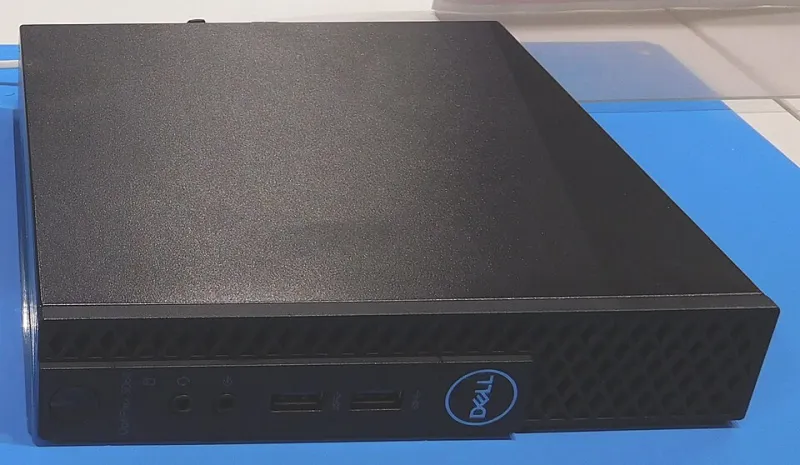
Photo: Cjp24, CC BY-SA 4.0, via Wikimedia Commons
Asset management looks like a spreadsheet problem until you are standing in a closet with a label printer, a scanner that will not pair, and 200 devices that nobody wants to count twice. For this lab run, we grabbed a used $65 Dell Micro from a local surplus sale—i5-7500T, 8 GB RAM, 256 GB SSD—and installed two free open-source platforms: Snipe-IT and GLPI. Then we pointed both at the same small US IT shop’s closet for 45 days. Same 200 devices, same three technicians, same sticky labels.
The Hardware and the Rules
We ran both tools in separate Docker networks on the same Dell Micro so the hardware was identical. The box sat on a shelf next to the switch stack, drawing about 11 watts at idle. The closet inventory included 74 laptops, 51 monitors, 22 docks, 18 switches and access points, 19 license seats, and 16 warranty records that were mostly wrong. We did not clean the data before import. That was deliberate. Real closets are messy.
We tracked setup time, weekly staff time, alert volume, backup success, and restore time. We did not count our own writing time. We did count the shop’s technicians, who were nice enough to scan things and complain about it.
Setup Was Not the Hard Part (Except When It Was)
Snipe-IT went up in 38 minutes using Docker Compose with MariaDB and a self-signed certificate. The web installer was straightforward, and the sample data helped us understand the asset model before we imported anything. The only surprise was the mail settings—our first test email landed in spam because the shop’s SMTP relay did not like the container hostname.
GLPI took 1 hour and 10 minutes. The PHP 8.2 and MySQL stack itself was fine, but file permissions and the cron job needed a few passes. We also enabled the Barcode plugin, which is where the first real detour happened: mapping the inventory fields to the label template took longer than the base install. Neither setup was painful for someone who has deployed a LAMP app before. Neither was a one-click appliance, either.
Labels, Scanners, and the Check-In Desk
We printed Code 128 labels on a $28 USB scanner setup and stuck them on everything that would hold still. Snipe-IT’s built-in label designer is friendlier. We had a usable template in about 15 minutes, and check-in/check-out worked exactly like the techs expected: scan, confirm, done.
GLPI needed the Barcode plugin plus a field mapping detour before labels looked right. Once configured, scanning worked well, and the asset lifecycle view was more detailed than Snipe-IT’s. But the extra click per check-in added up. Over 45 days, the shop processed 63 check-ins and 41 check-outs. Snipe-IT averaged 22 seconds per transaction at the desk. GLPI averaged 31 seconds. That is not a huge gap, but it is the kind of gap that decides whether technicians actually use the tool.
Alert Fatigue Is a Feature Until It Is Not
Both platforms can send warranty and license expiry alerts. Both will happily bury you if the import data is bad. Our first week produced 147 alerts because old warranty dates were still in the system. Snipe-IT let us throttle alerts to 30, 14, and 7 days with a cron tweak. GLPI’s notification queues are more powerful, but we spent two afternoons debugging why some alerts fired twice and others did not fire at all.
By week three, we had both tools tuned to a sane volume: 18 alerts per week from Snipe-IT and 21 from GLPI, mostly warranty expirations and license seats approaching renewal. The technicians ignored both sets equally until we started putting the alerts in the Monday stand-up. That is a people problem, not a software problem, but it belongs in the review.
Backups and the Restore Test
We ran nightly database dumps plus file backups for both tools. Snipe-IT’s backup footprint was smaller and the restore was boring: 9 minutes on day 21, including the uploads directory. GLPI took 22 minutes because we forgot the config directory on the first attempt and had to redo it. That was our mistake, not GLPI’s, but it is a reminder that “free” asset management still needs a backup plan you have actually tested.
The Real Bill: Staff Time Over 45 Days
Setup time was 4.5 hours for Snipe-IT and 7 hours for GLPI, including the label and alert tuning. Weekly staff time—check-ins, corrections, alert review, plugin updates—averaged 2.1 hours for Snipe-IT and 3.4 hours for GLPI. At a loaded rate of $35 per hour, that is roughly $330 versus $535 in labor across the 45 days. Neither tool is expensive in license fees. Both are expensive in attention.
Which One Fits the Closet
If your shop needs simple asset check-in/out, barcode labels, and warranty reminders without a service desk overhaul, Snipe-IT is the easier sell. It is not as deep, but the technicians used it without a training session. If you already run GLPI for help desk or want a fuller asset lifecycle view, the extra setup and weekly time may be worth it. The $65 Dell Micro handled both without breaking a sweat—RAM peaked at 1.8 GB and CPU stayed under 20 percent during label printing and imports.
We would run either one again on cheap hardware. We would not run both at the same time unless we were being paid to compare them. The real lesson from 45 days in the closet is that the best asset tracker is the one your technicians will actually scan into on a Tuesday afternoon when they have three other tickets open.