The 500-Page Office Test: Three Free Wikis on a $60 Secondhand Mini PC

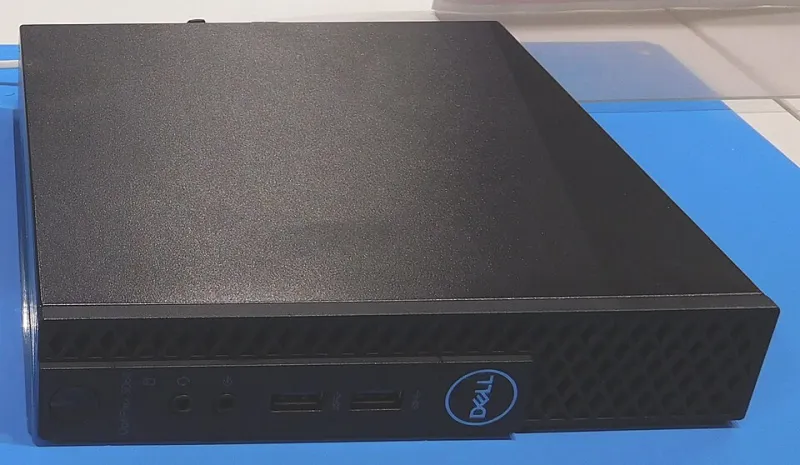
Photo: secondhand mini desktop computer on office desk with documentation on monitor, via image3.slideserve.com
The setup: a tiny box, a big pile of docs, and ten people with opinions
Knowledge-base software looks cheap right up until you add people. A polished SaaS wiki at $10 per user per month is $100 a month for a ten-person shop, or $1,200 a year before anyone writes a single page. That is not catastrophic, but it is the kind of subscription that survives budget season by hiding in the software line item.
So FreeSoft Labs did what we usually do: bought a used mini PC for $60, installed Debian stable, and asked a ten-person team to move a 500-page internal documentation project onto three free knowledge bases. We ran BookStack, Wiki.js, and Outline one at a time on the same hardware for 30 days in November 2026. The box was an HP EliteDesk 800 G1 Mini with an i5-4590T, 8GB of RAM, and a 128GB SSD. It is not fast. It is not pretty. It cost less than a decent office chair.
The team was a realistic mix: two people who actually enjoy documentation, five who tolerate it, two who only click links from email, and one person who writes every process in all caps. We seeded the wiki with 500 pages of policies, onboarding notes, vendor contacts, and the usual archaeological layer of old procedures. Then we let them work.
How we tested without turning it into a science fair
Each tool got its own clean install and its own week of setup, followed by real daily use. We measured three things that matter in a small office: how fast search felt, how badly permissions annoyed people, and how much work it took to back up and restore the whole thing.
For search, we ran 30 common queries, including people searches, error-message searches, and the classic 'where is the thing that used to be on the shared drive' search. For permissions, we created admin, editor, and read-only accounts, then added a guest link and removed a departing user. For backups, we ran a nightly job and did one restore to a fresh virtual machine to see whether the documentation survived the trip.
This was not a benchmark lab with controlled temperature and a lab coat. It was an office test. That is the point.
BookStack: the one people stopped complaining about
BookStack felt familiar to the team almost immediately. The shelf-book-chapter-page structure maps well to how small businesses already think about documentation, and the WYSIWYG editor meant the all-caps person could paste from Word without a fight.
Search averaged about 0.4 seconds for our 30 queries after the index settled. That is not instant, but nobody waited long enough to open a second tab. Permissions were simple: roles, page-level restrictions, and a reasonably clear admin screen. It was not granular enough for a law firm with client-specific content, but for a ten-person office it was enough.
Backup was the pleasant surprise. A database dump plus the uploads folder gave us a restore that worked on the first try. Setup took less than an hour, and the box sat at roughly 700MB of RAM idle. BookStack is not the flashiest wiki in this test, but it was the one the team used without a training session.
Wiki.js: prettier, more capable, and more likely to make you read the docs
Wiki.js looks like a modern documentation site, which matters when you are trying to get non-technical staff to actually use the thing. Markdown editing, Git sync, and a clean reading experience made it the favorite of the two people who already like documentation tools.
Search was slower in our test, averaging around 0.7 seconds after we configured the search engine and let it index. That is still fine, but it was noticeably less snappy than BookStack on the same hardware. Permissions were more flexible, which is another way of saying more confusing. We could build granular rules, but we spent time arguing about whether a group, a page rule, or a navigation setting was the real source of truth.
Backup involved the database, uploaded assets, and configuration files. Our first restore attempt missed the uploads and produced a wiki full of broken images and sad little file links. The second attempt worked. Wiki.js rewards patience and punishes people who assume a database dump is enough. Setup took about two hours including search configuration, and idle RAM was around 900MB.
Outline: the slickest option, with the heaviest baggage
Outline is what happens when a wiki wants to feel like a chat app. The editor is excellent, search is fast, and the overall experience feels expensive in a way that makes people assume it is expensive. Search averaged about 0.3 seconds in our tests, the best of the three.
It also needed the most hardware. Outline runs with PostgreSQL, Redis, and object storage, and our 8GB mini PC felt it. Idle RAM was closer to 2.5GB, and backups occasionally pushed the box into swap while the team was still working. It never fell over, but it complained in the logs like a server that had been asked to do too much before lunch.
Permissions were clean in a team-based way: groups, collections, and document access. Backups were the hardest of the three because you have to capture the database and the object storage together. Restore worked, but it took planning. There is also a licensing caveat: Outline's self-hosted community edition is free, but the project uses a source-available license and pushes some features toward paid tiers. Check that before you standardize a business on it.
The scorecard that matters more than a spec sheet
| Tool | Idle RAM | Average search | Setup time | Backup restore | Office mood |
|---|---|---|---|---|---|
| BookStack | ~700MB | 0.4s | Under 1 hour | Easy | Quietly happy |
| Wiki.js | ~900MB | 0.7s | About 2 hours | Medium | Impressed but confused |
| Outline | ~2.5GB | 0.3s | About 3 hours | Hard | Very impressed, slightly worried |
The real monthly bill
The hardware was $60 once. Electricity for a mini PC running 24/7 in the US is roughly $2 to $4 per month depending on local rates. Backup storage can be free if you use an existing NAS, or $1 to $5 per month for offsite object storage. Admin time after setup was the wild card: BookStack settled into about an hour a month, Wiki.js took two or three, and Outline took three or four if we counted dependency updates and backup checks.
Compare that with a paid knowledge base at $8 to $12 per user per month. For ten people, that is $80 to $120 monthly. The open-source route is absolutely cheaper in cash. It is not free in attention. If you value admin time at $50 per hour, a three-hour monthly maintenance habit costs $150, which can erase the savings. The honest answer is that the $60 mini PC can replace a subscription, but only if someone on staff is willing to own it.
What we would actually deploy
For a ten-person office that just needs a reliable internal wiki, BookStack was the winner. It was fast enough, simple enough, and the backup story did not require a prayer. Wiki.js is the better choice if your team lives in Markdown or wants Git-backed docs. Outline is the best experience if you can give it more RAM and accept the licensing and backup complexity.
The $60 box did not embarrass itself. It also did not perform miracles. A free knowledge base is a real option for a small US shop in 2026, but the subscription you are replacing is not just software. It is also the person who remembers to back it up.